
Qualstar logo
Product ReleaseEnterprise ITArticle

The LTO-10 Reset: Enterprise Tape Without Enterprise Overhead

LTO-10 drives read and write LTO-10 media only, so every LTO-10 archive starts from zero. Why that makes this the right moment to re-price the library, and where the Qualstar Q1000+ fits.

Published in Archive · 6 min read

Aisle of server and storage cabinets in a modern data center
Vendors differ in the library around the drives: robotics, chassis, management software, and service.

LTO has always been an open format. Drives and media from different manufacturers are interoperable, and a cartridge written in one vendor's library can be read in another's. Most drives on the market originate from the same source. The primary differences between vendors are in the library: robotics, chassis, management software, service, and the operational procedures your team has established.

This is why tape upgrades are typically incremental. Each new drive generation has supported at least some existing media, making it easier to add drives to the current library and continue operations. Extending the library, software, workflows, and media estate has generally been more cost-effective than replacement, so most buyers have chosen to extend.

LTO-10 changes this dynamic. An LTO-10 drive reads and writes only LTO-10 media. It cannot read LTO-9 tapes or replace LTO-9 drives. Your existing media retains its value, and your current library remains operational. However, the next level of capacity requires new drives and a new media pool, regardless of vendor.

This prompts a broader question: should you add LTO-10 to your existing library, or use this opportunity to reconsider your entire library strategy?
What LTO-10 changes

Four key factors are important for planning.

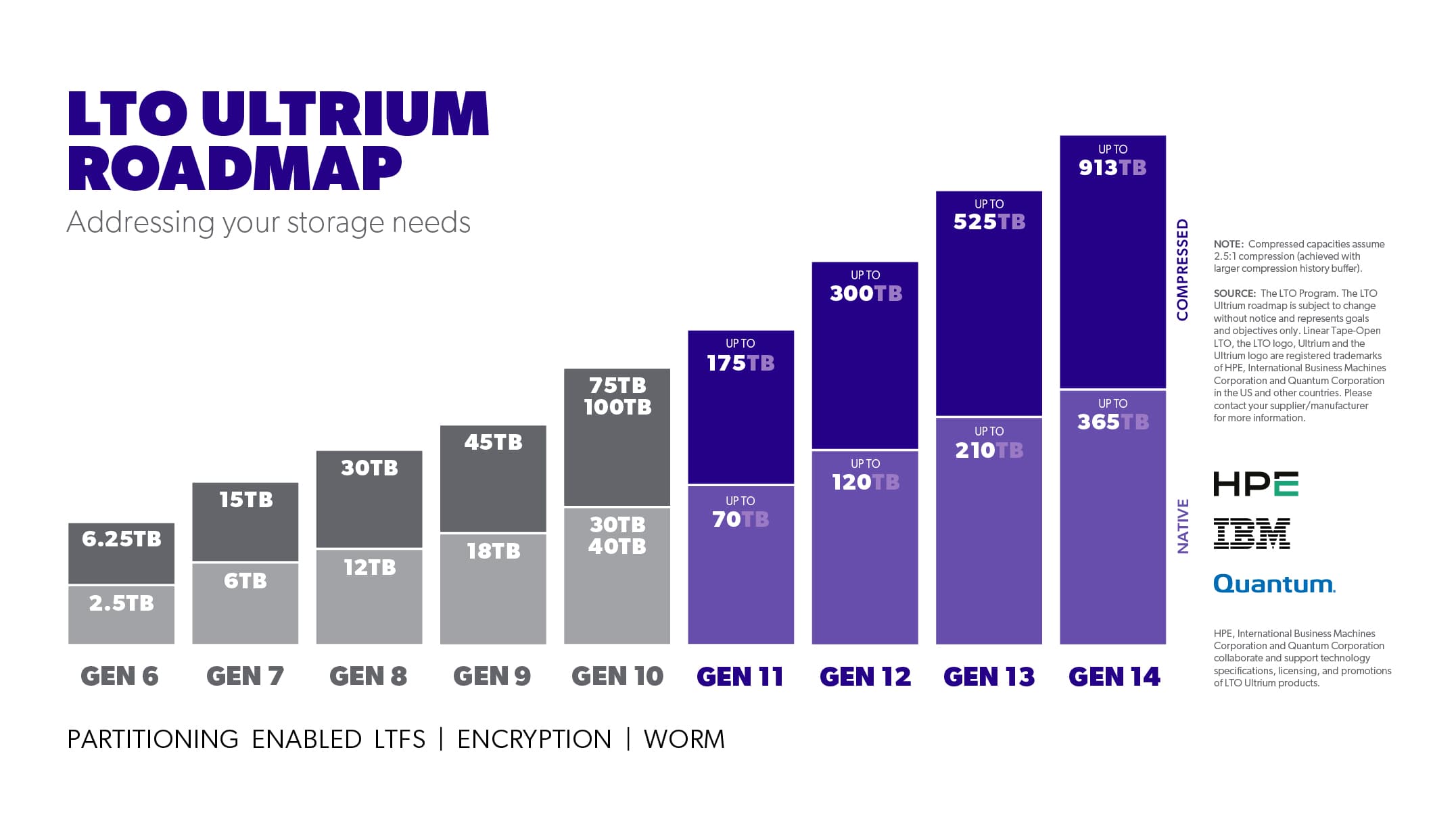
  • Capacity increases significantly. Cartridges start at 30 TB native and 75 TB compressed, with a larger media class reaching 40 TB native and 100 TB compressed.
  • Backward compatibility is no longer available. LTO-10 drives read and write only LTO-10 media. Previous generations could service media from the prior generation; LTO-10 cannot.
  • New media is ready for use immediately. LTO-9 required a lengthy first-use optimization step, which LTO-10 eliminates. Simply load a cartridge and begin operations.
  • The open standard remains. Drives and media continue to be interoperable, LTFS maintains file-based workflow portability, and WORM and hardware encryption are still supported.

The loss of backward compatibility introduces a tangible operational cost. You will still need LTO-9 drives to access your LTO-9 tapes. However, this also provides a rare opportunity to re-evaluate and re-price your entire platform.

LTO Ultrium roadmap chart of cartridge capacity by generation from LTO-6 to LTO-14, with LTO-10 at 30 TB or 40 TB native and 75 TB or 100 TB compressed
LTO-10 cartridges hold 30 TB or 40 TB native, and 75 TB or 100 TB compressed at 2.5:1. Source: the LTO Program.View full size

The reset, in plain terms

Buyers have typically remained with their incumbent vendor due to the surrounding infrastructure. For large libraries, the most cost-effective upgrade is usually to add a new drive generation within the existing system, retaining the chassis, robotics, management layer, software integrations, and operating procedures. This approach allows continued support for older media and maintains a strong, fair position for the incumbent.

LTO-10 preserves most of this structure, but the new drives do not support older media. Large LTO-9 archives will still require LTO-9 drives. LTO-10 drives will create a new LTO-10 media pool from the outset, regardless of the library used.

This broadens the decision. Upgrading your existing library remains an option, but determining the platform for your next 10, 20, or 50 petabytes is now a distinct consideration. For the first time, these choices can be priced separately. Your current vendor may still be the best fit, and we welcome comparison.

Enterprise lite, defined

Large tape systems are typically sold through traditional enterprise models, which involve long procurement cycles, large minimum configurations, professional services, and premium support tiers. This approach suits some organizations well.

Many buyers require enterprise capacity without the associated overhead. We developed the Q1000+ to meet this need. This 'enterprise lite' solution offers the density and scale of a large archive platform, managed as standard infrastructure.

A 48U Q1000+ accommodates up to 1,115 cartridges and 24 full-height drives. With 40 TB LTO-10 media, this equates to 44.6 PB native or 111.5 PB at a 2.5:1 compression ratio per rack. The entire rack consumes less than 300 W at peak. Once a rack is full, the architecture scales across additional racks to support exabyte-class retention.

Connectivity options include standard SAS or Fibre Channel. The library supports both LTO-9 and LTO-10 drives. LTFS, WORM, and encryption function as they do on any LTO platform. There is no new tape format or proprietary media. The archive remains accessible by any LTO drive, and automation is available on more favorable terms.

LTO-9 does not disappear on upgrade day

Transitioning to LTO-10 does not require rewriting your LTO-9 archive. Both generations will need to operate concurrently during the migration period.

LTO-9 drives will continue to serve LTO-9 media, while LTO-10 drives manage the new pool. Existing cartridges remain in place until retention policy, capacity needs, or hardware lifecycle necessitate migration.

The Q1000+ supports both LTO-9 and LTO-10 drives within the same library. In a mixed configuration, the existing archive remains accessible while new data is written to LTO-10. Migration becomes a matter of scheduling: repack data that warrants moving, retain data that does not, and consolidate cartridges when LTO-10 density offers clear benefits, according to your timeline.

Where the switching opportunity sits

For example, if you have 10 PB on LTO-9, purchasing LTO-10 drives from your current vendor does not address that existing capacity. The LTO-9 estate still requires LTO-9 hardware. Each LTO-10 cartridge represents new capacity, which can be allocated to your incumbent's library or to an alternative solution.

Your decision should be based on the factors that differentiate library vendors: capacity density, drive count, expansion model, reliability, management, software compatibility, service, lead time, support, and price.

Supply is part of the decision now

Storage procurement in 2026 will occur under significant capacity constraints. Seagate has indicated that most nearline capacity is allocated through 2028. Western Digital reports being sold out through 2026, with lead times on large nearline orders now exceeding a year. These factors impact storage planning, even when the archive is ultimately stored on tape, as plans must account for actual product availability.

Therefore, ask each vendor the same three questions: What can you deliver? When can you deliver it? What is the availability of the required media?

We maintain tape media inventory and provide availability information with our library quotes. In the current market, supply considerations are integral to architectural planning.

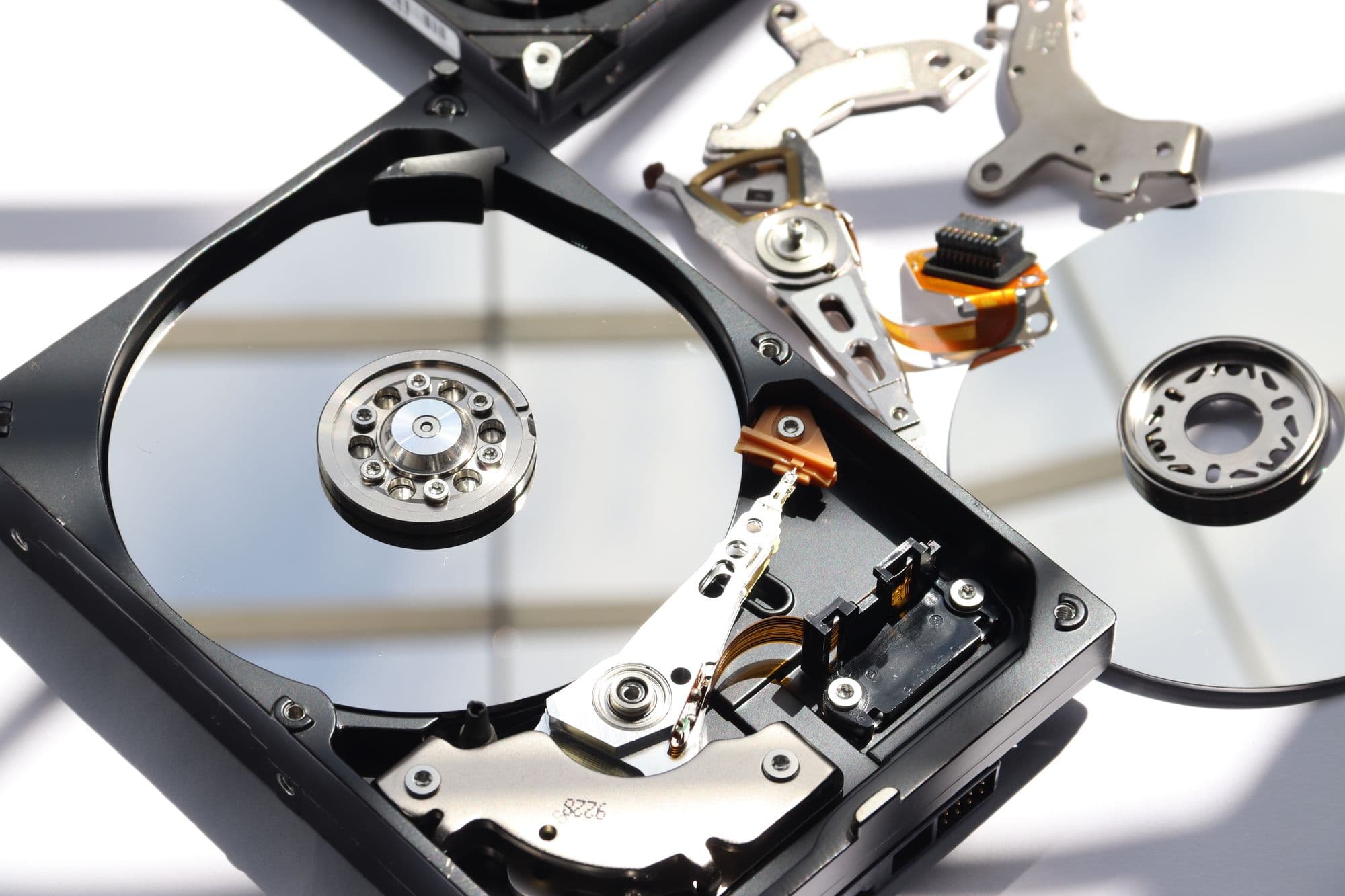
Opened hard disk drive with its platters and read/write arm exposed
Seagate reports most nearline disk capacity allocated through 2028. That limit shapes storage plans even when the archive goes on tape.

How to plan the move

  • Inventory your assets. LTO-10 will not read LTO-7, LTO-8, or LTO-9 media. Determine the amount of data on each generation and how long it must remain accessible.
  • Retain necessary legacy drives. Deploying LTO-10 does not require immediate migration. Ensure continued access to all generations required by your retained media.
  • Repack data selectively. Higher density reduces cartridge counts, but data migration consumes drive time and bandwidth. Migrate when justified by economics or lifecycle considerations.
  • Re-evaluate the architecture. Your existing platform retains value and should be considered as part of your decision-making process.
  • Plan media procurement alongside hardware. Order media with the library and confirm availability before making a commitment.
  • Plan for growth. If retention requirements are increasing rapidly, rack density and expansion economics will be more significant in the long term than at installation.
IT engineer typing at a console in a server room
Start with an inventory: how much data sits on each LTO generation, and how long it must stay readable.

The short version

LTO-10 provides a clear decision point. If you would like a tailored analysis for your archive, please share your current capacity, LTO generation, annual growth rate, and retention horizon. We will size a Q1000+ solution and advise whether enterprise lite is suitable for your needs.

Best-fit library

Q Series Tape Libraries

Compare the Q8, Q24, Q40, Q80, and Q1000+ LTO tape libraries.

Compare libraries

Related posts

Product ReleaseGeneral

Advantages of Modern LTO

Qualstar's CTO on what modern LTO tape does today: the cold storage backbone for cloud hyperscalers, and lower cost than disk and flash at scale.

Indexed from @Qualstar_Channel videos · 4 min read

Product ReleaseGeneral

What you need to know about LTO10

Qualstar's CTO on LTO-10 tape: no pre-formatting for new cartridges, the tilted head design, and what the changes mean for tape libraries and restores.

Indexed from @Qualstar_Channel videos · 4 min read

Product ReleaseGeneral

LTO 7 End Of Sale

LTO-7 tape last-time purchases run through December while supplies last. Why LTO-7 drives matter for repacking LTO-5, 6, and 7 archives onto LTO-10.

Indexed from @Qualstar_Channel videos · 3 min read